
SCENARIO
When attempting to sync an order to Fishbowl, you encounter an error that highlights the order in red in the Orders List view with the following error message when you review the order details:
Failed understanding Data Response: {"FbiJson":{"Ticket":{"Key":"1ad03b8e-2410-401b-bf7a-fb7a71c37966"},"FbiMsgsRs":{"statusCode":1130}}}
CAUSE
This error, as ambiguous as it is has only been found so far to relate to 1 of two scenarios:
-
Most common cause: The error usually occurs when the maximum number of user licenses is already logged into the Fishbowl server at the time of attempting to sync the order.
-
Less common cause: The error can also happen if the login credentials used to connect to Fishbowl have been recently updated. This can also include corrupted passwsords - so the customer may not even know the password is wrong/changed.
RESOLUTION
- You'll need to check the fishbowl server running on your network to see which users and how many are logged into your Fishbowl. Before running another sync - you'll need to log out enough users from your Fishbowl to allow at least one free user login per the maximum number of user licenses you have on your Fishbowl account.
Once a license is free, you'll need to reset the order to "pending" status and re-sync it. - If #1 doesn't resolve the issue - then you'll need to double-check the password used to connect to the Fishbowl server for the Webninja sync.
You can double-check the settings for this on your site by following these steps:- log into the CMS of your site (yourdomain/admin)
- go to the "Sync" drop-down at the top of the CMS - and select "Sync Settings"
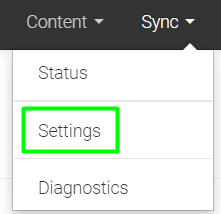
- on the Sync Settings page, scroll down to the API user/pass settings and ensure the correct user/pass details are entered there - if there's been a recent password change to these credentials - they'll need to be updated here:
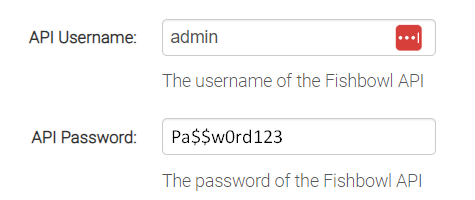
- Failing that - there may be a corruption in the Fishbowl Connections Manager server that's reset the admin password (if you can open the Fishbowl Server
without needing to enter credentials - it's likely had the password reset back to default).
If that's the case - you can't use the same password again (even if you reset it to the same password as you had it - it'll still continue to fail) - you'll need to create a new password for "admin" and update the settings per the step (c) above - Once reset - test re-syncing the order/s again.
For further details on how to re-sync orders please refer to the following article:
How to Resync an order
NOTE: these fixes have been confirmed multiple times over the past several years and aren't simply a "best guess" even though the error message very much appears to point to other possible causes!