
Page titles and meta descriptions let you suggest how your pages appear in Google search results, but Google decides what to display. Meta descriptions do not control indexing or affect search rankings.
OVERVIEW
Meta tags are snippets of HTML code that give search engines information about a page. They sit in the page’s HTML "head" section of the code and aren’t visible in the page content, but search engines can see them in the page's source code.
SEO MANAGER - OVERVIEW:
Open the SEO Manager
-
Login to the admin area
-
Navigate to Content > SEO Manager
-
Choose from a list of pages on your site and click Go
(note: depending on how your site is configured, you may not have all the same options as the depiction below)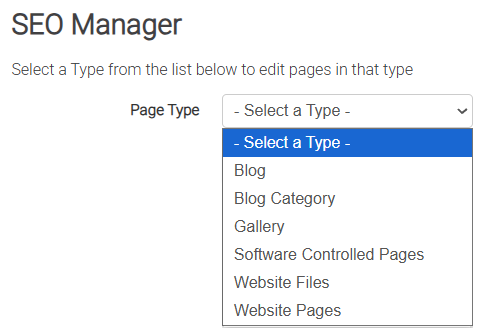
-
Select the page you'd like to change from those available

-
Enter your metadata in the screen and click Save Changes when you're done.
(note: ignore the Meta Keywords field as this is a deprecated HTML functionality that all modern search engines ignore now)

TYPES OF FIELDS YOU CAN EDIT:
TITLE:
The HTML title tag sets the page title shown in browser tabs and saved favourites. Search engines may also use it as the title in search results. You'll want to keep this to a minimum, generally no more than 66 characters.
META DESCRIPTION
A meta description is a short summary of your page that search engines may show beneath its link in search results. For example: ‘All you need to know about Fishing in Australia’. Aim for 170–200 characters and write a clear, useful summary that encourages people to visit your site.
META KEYWORDS (deprecated):
Meta keywords once helped search engines understand a page’s topics, but major search engines no longer use this tag, so you can leave this field blank. Google now uses the page’s content and its algorithms and AI systems to match it to relevant searches.
Keyword research and management is a major part of any SEO service, including Webninja's own SEO plans and services. If you'd like help with your SEO strategy and don't know where to begin - please contact us to enquire about our available SEO plans.
Effective keyword research and SEO planning take time, expertise and ongoing adjustments to Google’s changing algorithms. This can be challenging to manage without specialist knowledge, so consider an experienced SEO service to help improve organic traffic to your site and products.