
An order must meet the configured criteria across these filters to be eligible for import.
These are internal Web Ninja settings, managed by our team. Please contact Web Ninja Support to confirm the configuration on your Shopify connector or to request a change to these settings.
example:
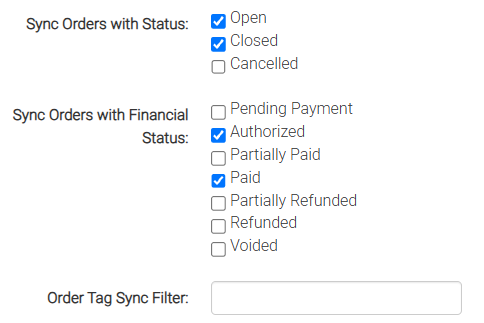
Order status
Sync Orders with Status determines which Shopify order statuses are included:
- Open
- Closed
- Cancelled
More than one status can be enabled. An order must match one of the enabled order statuses to pass this check. NOTE: you generally want to keep "Closed" ticked because otherwise your team may manage the order and already close it before we've had a chance to pick it up on the sync - so unless you have a very specific reason to omit "closed" orders - it's best that we leave both statuses ticked.
Financial (payment) status
Sync Orders with Financial Status determines which payment statuses are included:
- Pending Payment
- Authorized
- Partially Paid
- Paid
- Partially Refunded
- Refunded
- Voided
More than one financial status can be enabled. An order must match one of the enabled financial statuses as well as an enabled order status.
Typically most connectors just have "Paid" and "Authorized" enabled - however some just have "Paid".
You may have other reasons for wanting orders to come through before payment has been confirmed (eg. you may have an internal process that requires you to manage or handle the order details within your ERP before the final payment has been confirmed - though we usually find this is a fairly rare scenario).
Order tags
The Order Tag Sync Filter lets us limit imports to Shopify orders with tags containing a specified value.
TAG FILTER EXAMPLE:
you may need your team to review orders before they are imported into your ERP. Once an order is approved, your team adds a “Ready” or "SyncReady" tag. With the filter set to “Ready”, orders without that tag value are excluded, even if they meet the order-status and payment-status criteria.
Example configuration
Based on the screenshot above:
Under the two status filters, an Open or Closed order with an Authorized or Paid financial status is eligible. Cancelled orders are excluded, as are orders with any of the other financial statuses shown.
As always - if you're unsure how your connector is configured - check with Web Ninja's support team and we'll be happy to double-check the settings for you.
Support checks
If a Shopify order has not imported, or you want to change which orders are included:
-
Check the order’s current order status, payment status and tags in Shopify.
-
Ask Web Ninja Support to confirm whether these match your connector’s order-status, financial-status and tag filters. These settings are managed internally by Web Ninja.
-
If a change is needed, explain which orders you want imported and when, such as only after payment is captured or after your team adds an approval tag.
-
Once Web Ninja confirms the change has been applied, check that a suitable order meeting the updated criteria imports as expected.